We spent six months and $115,000 building AI features no one used. Here’s why it happened and how to avoid making the same mistake.
- Problem: We assumed customers would embrace complex AI features without validating their needs.
- Result: Zero users adopted the features, leading to wasted time, budget overruns, and customer frustration.
- Key Lesson: Customers don’t pay for flashy tech - they pay for solutions to real problems.
What Went Wrong:
- Ignored Customer Input: We skipped asking users what they needed and built features we thought were "cool."
- Overcomplicated Solutions: Instead of solving everyday problems, we focused on advanced capabilities that didn’t fit workflows.
- Missed Validation: We didn’t test demand before committing six months of development.
How to Fix It:
- Talk to Users First: Identify recurring problems before building anything.
- Test Small, Build Fast: Validate demand with quick, manual tests before scaling.
- Track Metrics Early: Monitor feature usage from Day 1 to measure impact.
The takeaway? Simplicity wins. Build features that solve real, frequent problems - not ones that just look impressive.
Why most AI products fail: Lessons from 50+ AI deployments at OpenAI, Google & Amazon
sbb-itb-9cd970b
The Root Cause: Building What We Wanted, Not What Customers Needed
Our technical abilities weren’t the problem. The issue was that we focused on creating features that we found exciting, rather than addressing what our customers genuinely needed.
We fell into the classic "Devs are Users" trap [10], assuming our workflows and preferences mirrored those of our customers. If a feature seemed cool or technically impressive to us, we convinced ourselves that customers would feel the same. They didn’t.
Instead of prioritizing what mattered most to users - like speed and seamless workflow integration - we fixated on metrics like achieving 94% model accuracy [1][3]. As Feri Fekete, Co-founder of VeryCreatives, aptly put it:
Users already have workarounds. Your AI competes with their habits, not their wishes [1].
This disconnect between technical achievement and usability reflected a larger issue: we assumed our preferences aligned with our users'. That assumption set the stage for even bigger mistakes.
Making Assumptions Instead of Asking Customers
This misalignment forced us to confront another major flaw: we didn’t ask customers what they needed before we started building.
We believed that if we created something, customers would automatically embrace it. This mindset led us to skip an essential step - talking to customers before writing a single line of code [7][4]. We assumed users wanted "better" or "more accurate" results, but we never confirmed if those were their actual priorities.
The consequences of this kind of oversight are staggering. Research shows that only 5% of features account for the majority of user activity, while 80% go unused [2]. Stephen Collins, a Senior Software Engineer, summed it up perfectly:
AI is exciting, but people don't pay for technology - they pay for solutions [7].
Building Complex Features When Simple Solutions Work Better
We spent six months developing advanced AI features, but our customers needed something far simpler. Instead of delivering practical value, we chased a "wow" factor that looked great in demos but didn’t solve real problems.
This phenomenon, sometimes called the "Fugazi Factor", describes AI that dazzles in presentations but fails to deliver business value because it addresses novelty problems instead of daily challenges [8]. We focused on what AI could do, rather than identifying repetitive tasks our users needed help with [3].
Take incident.io as an example. Over 75% of their incident summaries are now AI-generated because they tackled a specific, repetitive task [3]. Their co-founder, Stephen Whitworth, explained their approach:
Look less at 'what cool new things could AI do' but more at 'what's the thing our users do 100 times a day that AI could make better' [13].
We went in the opposite direction, pouring resources into complex features for edge cases instead of simple solutions for everyday needs.
One case study drives this home: a five-month project to build an AI recommendation system resulted in only 12% user engagement. A simpler solution could have validated demand in just weeks [2]. We wasted six months on something that could have been resolved - and learned from - in six weeks.
What This Mistake Cost Us: Time, Money, and Customer Trust
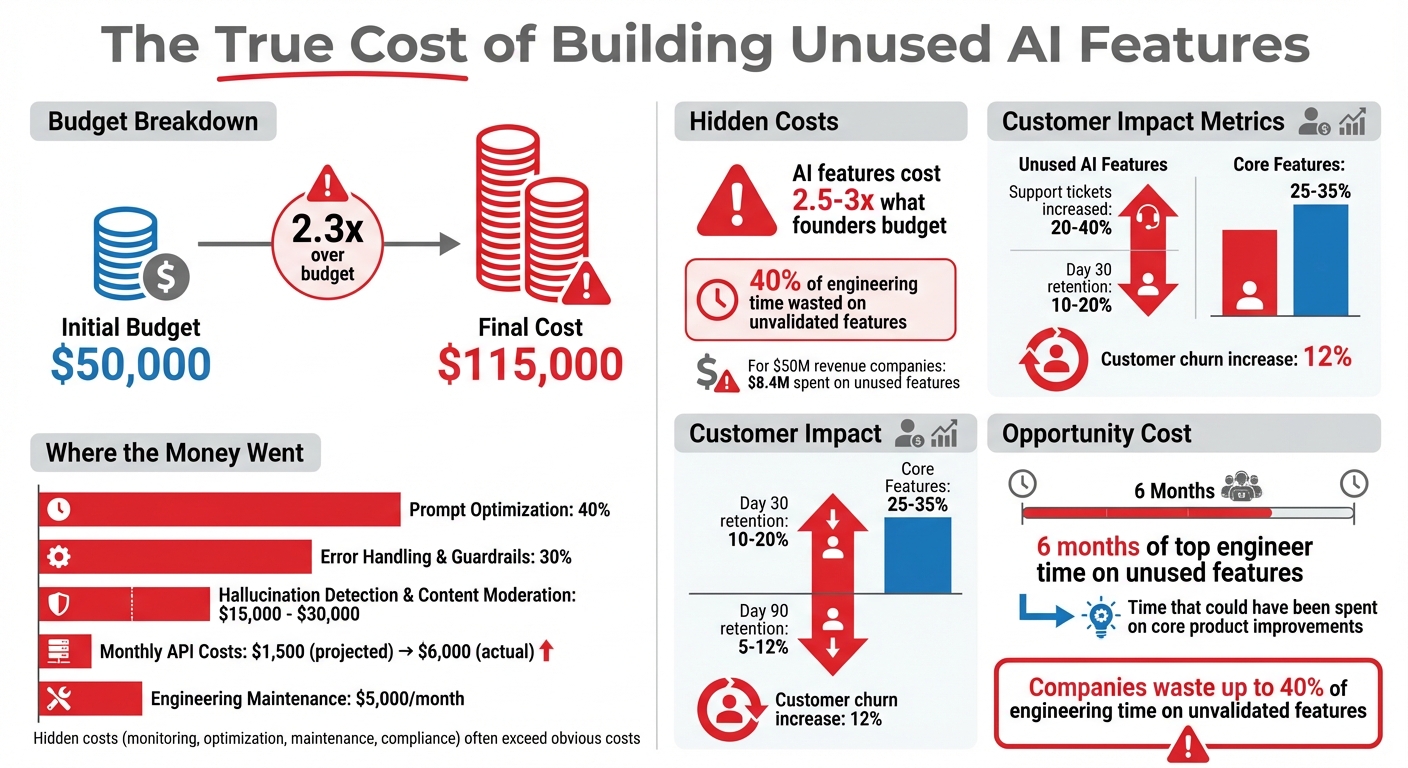
The True Cost of Building Unused AI Features: 6-Month Development Breakdown
Six months of hard work and development left us with features no one wanted, a blown budget, and shaken customer confidence.
6 Months and $115,000 Lost on Features Nobody Wanted
We started with a $50,000 budget for development. By the end of the first year, that number had ballooned to $115,000. Why? As Matthew Turley, a Fractional CTO, explains:
"AI features cost 2.5-3x what most founders budget. The 'hidden' costs (monitoring, optimization, maintenance, compliance) often exceed the obvious costs." [14]
Here’s where the money went: 40% was spent on prompt optimization, 30% on error handling and guardrails, and $15,000–$30,000 on systems for hallucination detection and content moderation. Monthly API costs, initially projected at $1,500, skyrocketed to as much as $6,000. Add $5,000 per month for engineering maintenance, and it’s easy to see how things spiraled [14].
The financial hit was bad enough, but the opportunity cost might have been worse. Our top engineer spent six months on these features - features that went unused - when they could have been improving the core product that our customers depended on. Research shows that companies waste up to 40% of engineering time on unvalidated features [2]. For a software company generating $50 million in revenue, this could mean $8.4 million spent on features that customers don’t use [5].
The root of the problem? We built for our own excitement instead of solving real customer problems. And the fallout didn’t stop at financial losses - it extended to customer trust.
How Misaligned Features Damage Customer Confidence
The financial overrun was just one piece of the puzzle. Misaligned features also created confusion and frustration among our users. When we launched these advanced AI features, support tickets jumped by 20–40% as customers struggled to understand what they were supposed to do [8].
Then came the "tourist effect." Users tried the features once, called them "neat", and never returned. Retention rates told the story: Day 30 retention for these features was just 10–20%, compared to 25–35% for our core offerings. By Day 90, retention had plummeted to 5–12% [8]. One software company even experienced a 12% increase in customer churn after redirecting resources away from high-value improvements [2].
The damage wasn’t just in numbers - it was in perception. Customers began questioning our priorities. As Stephen Collins, Senior Software Engineer, noted:
"AI is exciting, but people don't pay for technology - they pay for solutions. I focused on cool AI features instead of solving a painful, urgent problem." [4]
This experience drove home a critical lesson: no matter how impressive a feature might be, if it doesn’t address a real customer pain point, it risks eroding trust.
How to Build Features Customers Will Actually Use
After learning from past mistakes, we honed our approach into three practical steps to ensure the features we build genuinely address customer needs. These steps emphasize validating ideas early and iterating quickly - saving time and effort compared to drawn-out, ineffective processes.
Talk to Customers Before Writing Code
Don’t start building anything until you’ve heard the same problem at least five times. This is what we call the Complaint Rule. It involves gathering recurring issues directly from users through support tickets, sales calls, churn interviews, or even customer Slack channels. If a problem isn’t mentioned at least five times - and in the user’s own words - it’s probably not worth pursuing[1].
Before diving into development, test the demand first. Use the Concierge Test: manually deliver the experience you’re planning to build to users who’ve recently encountered the problem. This hands-on approach helps confirm whether users actually need the feature and if it fits into their workflow[1]. Often, by observing users in their natural settings, you’ll discover that features fail not because they’re poorly built but because they require users to break deeply ingrained habits[6][12].
Ask yourself one tough question: If this feature disappeared tomorrow, would customers leave? Seth Wilson, a seasoned product leader, shared this insight:
That silence was the loudest feedback we could have received[12].
This question helps you distinguish between "painkiller" features that solve critical problems and "vitamin" features that are just nice-to-have.
Build Small, Test Fast, and Improve Based on Feedback
Instead of perfecting features behind closed doors, release early alpha versions for customers to test in their real-world environments[9][15]. This approach helps you quickly identify what works and what doesn’t - without wasting resources on unnecessary polish.
If your team starts creating workarounds to overcome technology limitations, stop the project immediately. It’s better to cut your losses than to push a flawed feature to market[9]. Revisit discarded ideas every few months or when there’s a major technological breakthrough. Sometimes the right tools just aren’t available yet, but they might be in the future[9].
Track Usage Data from Day One
From the moment a feature launches, tag it to monitor adoption, usage frequency, and user behavior[5]. Focus on three types of metrics: a leading indicator (early behavior that signals success, like how many users open the feature before starting a task), a lagging indicator (a measurable business outcome, such as improved retention), and an early warning metric (for example, the percentage of AI outputs containing errors)[1].
Here’s a real-world example: In Q1 2024, TechFlow Solutions, a company with 6,000 employees, introduced tracking dashboards to address inconsistent use of their AI tools. By analyzing real-time adoption data and training managers, they boosted adoption metrics by 27% in just two quarters. This led to a 35% improvement in code review speeds and a 22% drop in bug rates[16].
After a year of using product adoption tools, companies reported a 50% increase in daily feature usage and a 25% drop in unused features[5]. The lesson? Data tells the truth - but only if you start collecting it from day one.
Conclusion: What We Learned and How You Can Avoid This
Developing unused features isn't just a waste of time - it's a costly mistake. Engineering teams can spend 3-6 months building a flashy "hero feature" that users ignore, burning through hundreds of thousands of dollars that could have been used to address real customer needs[11]. The reality is clear: most features go unused, while a small handful drive nearly all user engagement[2].
3 Lessons for SaaS Founders and Product Teams
- Your customers' complaints are your roadmap. If a problem hasn’t been mentioned at least five times by users in their own words, it’s probably not worth building[1].
- Test demand before writing code. Use the Concierge Test - deliver the experience manually to users before committing to development. If they don’t change their behavior when you make the solution easy for them, they won’t adopt it once it’s automated[1][17].
- End projects faster. If a feature doesn’t impact core business metrics within 90 days of launch, cut your losses and move on. Avoid falling victim to the sunk-cost fallacy[8][9].
These lessons lead to a bigger takeaway: solving real customer problems beats chasing unnecessary complexity.
Simple Solutions Beat Advanced Features Every Time
At the heart of it, users don’t crave complexity - they just want to get things done. As Seth Wilson, a product leader, aptly put it:
Users don't want to search. They want to be done[12].
Advanced AI features often fall into the "tourist effect", where users abandon them after the initial excitement fades. By Day 30, retention for these features can drop to 10-20%, as they fail to address daily needs[8]. On the other hand, dependable "CRUD" tools (Create, Read, Update, Delete) that tackle recurring problems tend to retain 25-35% of users over the same period[8].
The takeaway is straightforward: your goal isn’t to dazzle users with technical wizardry - it’s to make their work easier and faster. Focus on removing friction from their workflow, and let simplicity and genuine utility guide your development decisions.
FAQs
How do I pick an AI feature users will actually use?
When deciding which AI features to develop, the key is to address real, frequent problems rather than chasing trends or adding AI for its own sake. Begin by conducting in-depth user research to identify and validate genuine pain points. This ensures that the feature aligns with actual user needs and isn’t based on guesswork.
Focus on prioritizing features that have clear evidence of their potential to impact user behavior and business goals. Avoid relying solely on user requests or assumptions - data and research should guide the decision-making process. The most effective AI features are those that solve tangible problems and deliver measurable results.
What’s the fastest way to validate demand before building?
The quickest path forward is to zero in on real user problems rather than chasing solutions for needs you think might exist. Start by talking to potential users early on to uncover their actual challenges. Once you’ve identified these pain points, use quick, budget-friendly experiments or prototypes to test your ideas. This approach ensures you're addressing a problem that truly matters, saving you from spending time on features that might end up being overlooked.
Which metrics prove an AI feature is working early on?
Early signs of an AI feature's success often hinge on two key factors: the percentage of users who actually try it (indicating initial interest) and whether it provides measurable benefits or leads to consistent usage over time. By keeping a close eye on these metrics, businesses can gauge user engagement and how the feature performs in practical scenarios. This approach ensures efforts and resources are directed toward features that genuinely resonate with customers.